Automating Cloud Runs
At a glance
A script can queue runs against your saved projects and collect their results, authenticated by a Service token minted on Account rather than by your password. Cloud compute is metered against your plan.
Real compute (simulations, batch sweeps, optimizations) is a job: you submit it, poll it, and collect the result.
There is no server push. A client polls — the app itself polls every three seconds in the cloud.
An AI assistant on your computer — Claude Code, Cursor, VS Code — can drive your account through pvSpline's MCP server: create projects, run them and explain the results (AI Assistants).
Prerequisite: a portable project file (
*.pvspline.json) — the same document the app exports and imports. See Getting Started for how to get one out of the browser.
What you can automate
The browser is one client of the pvSpline engine, not the engine itself. When you press Run the project, the page posts your project document to an engine and polls until the result comes back. Nothing in that exchange is private to the browser, which is what makes automation possible at all.
- Automate around the cloud.
You can submit runs to the cloud service and collect their results without sitting in front of a browser. You authenticate with a Service token minted on Account, queue a run against one of your saved projects, poll it, and download the result and its artifacts. Cloud compute is metered against your plan.
- Through an AI assistant.
Connect an assistant to your account and ask in plain words: it creates the project, runs it on the cloud engine and reads you the results (AI Assistants).
Note
A script submits the same document the browser does: the portable project file (*.pvspline.json). It is self-contained — since it embeds the fetched weather and consumption series, a project you export today re-runs identically months later. Getting that file in and out of the browser is covered in Getting Started.
Jobs and polling
There is no server push. No websocket, no server-sent events, no callback URL. A client polls, and the freshness of what it knows is bounded by its poll interval. The app itself polls every three seconds against the cloud; that is a sensible interval to copy. Do not shorten a poll to fake liveness — you will not get updates any faster, you will only spend more requests.
Limits a script must respect
These are ceilings, not tuning knobs. A script that ignores them meets them as an opaque failure halfway through an upload.
| Platform ceilings | Meaning / effect |
|---|---|
| Synchronous call ceiling | Through the cloud gateway a synchronous call has roughly 29 seconds before it is cut off. Anything that could approach ten seconds must be a job, not a synchronous route. |
| Inline payload | The cloud path carries roughly 6–10 MB inline, and a run's project document is refused over 5 MiB with 413 PROJECT_TOO_LARGE. The app sends the heaviest embedded data separately, by reference, to stay under it. |
| File import, cloud | About 25 MB per file (24 MiB). The file is uploaded and referenced rather than inlined, so this is the ceiling it meets. |
| Artwork and permit photos | About 25 MB, because the browser must decode the picked image at full size before it is downscaled. |
| Browser-parsed files | Project, preferences, batch CSV, theme JSON and production series are parsed in the tab and bounded at 64 MiB for tab safety. The real pressure well below that is the browser's own session storage (a few MB) and the undo timeline (about 20 MB); both degrade gracefully rather than failing. |
| Scenarios per sweep | 1000. A larger config is a 400. |
| Cloud compute is metered | Runs count against a monthly per-company allowance of engine-seconds. Over it, the cloud answers 429 with the quota, what remains and what the run needed. Without an entitlement at all it answers 402. A job that fails is charged the engine time it used before failing, so a job built to fail costs what it burned. |
| Queued cloud jobs | No fixed cap on how many runs you queue or have running: the monthly allowance is the bound, and each job reserves its estimated engine time when it is queued, so a long queue can meet the 429 before any of it has run. The shared workers take turns between companies — the next free one starts the oldest queued job of the company served longest ago — so a backlog of yours does not hold another company's runs behind it, nor theirs yours. Paying customers' jobs go first, though: on the free plan a job starts only once no paying customer's job is waiting, and a batch or optimize job under way can be stopped for one — its status goes back to queued, it starts over, and the stopped attempt is not charged (Paying customers' work goes first). Within your company jobs start oldest first: while the workers are busy, a backlog a script queued runs ahead of your colleagues' later runs. Cancel queued runs you no longer need; it costs nothing. |
| Cloud API, every plan | Every plan caps the seconds of server time spent answering the company's requests in a calendar month — project sync, cloud runs, tile builds, 3-D streaming, Enedis, the engine relay, AI assistants and the rest. Signing in and the account, licence, billing, checkout and company calls are not counted, and a call that stops spending — a DELETE, a /stop — is never refused. Over the allowance every other counted call answers 429 API_ALLOWANCE_EXCEEDED with quota_seconds and used_seconds, until the allowance renews on the 1st. |
| Fair use | Beyond the allowances, shared capacity is protected on every plan: bursts of requests that degrade the service, and sustained back-to-back sub-hourly runs, may be throttled, and sustained or deliberate abuse can suspend the account. An automated loop that resubmits a failing job counts as abuse — back off and fix the cause instead. |
Tip
The size numbers are binary internally (MiB) but the app reports them in decimal (MB), because that is what a file manager shows — which is why a 24 MiB ceiling reads on screen as “25 MB”. Check a file's size before you read it, not after: the app refuses oversized files at the picker for exactly this reason.
Automating around the cloud
A script can queue runs against the cloud service and collect their results, with a credential that is not your password.
Service tokens
Open the Security section of Account (/account/security) and find Service tokens — machine credentials for CI runners, compute workers and AI assistants: scoped, revocable, and never tied to your password.
Mint a service token
Go to
/account/security, the account page's Security section, and find Service tokens.Type a name that says where it will live — the placeholder suggests
CI runner.Leave the scope at
Scripts and CI.AI assistant (MCP)makes a token that opens the AI-assistant endpoint only, for an assistant that cannot sign in (An assistant that cannot sign in).If the token will live on a server, in a container or in a CI pipeline, tick For a server, container or CI pipeline — takes a seat: on a subscription such a token takes a member seat of its own (Your Account, Team & Cloud Runs). A token you use yourself, on your own computer, takes none. The free plan has no seats, so there the box reads For a server, container or CI pipeline and such a token takes none either.
Click Create token. The full token is shown once. Copy it into your secret manager now; it is never shown again.
The list then shows the token's name, scope and last use, with Revoke beside it.
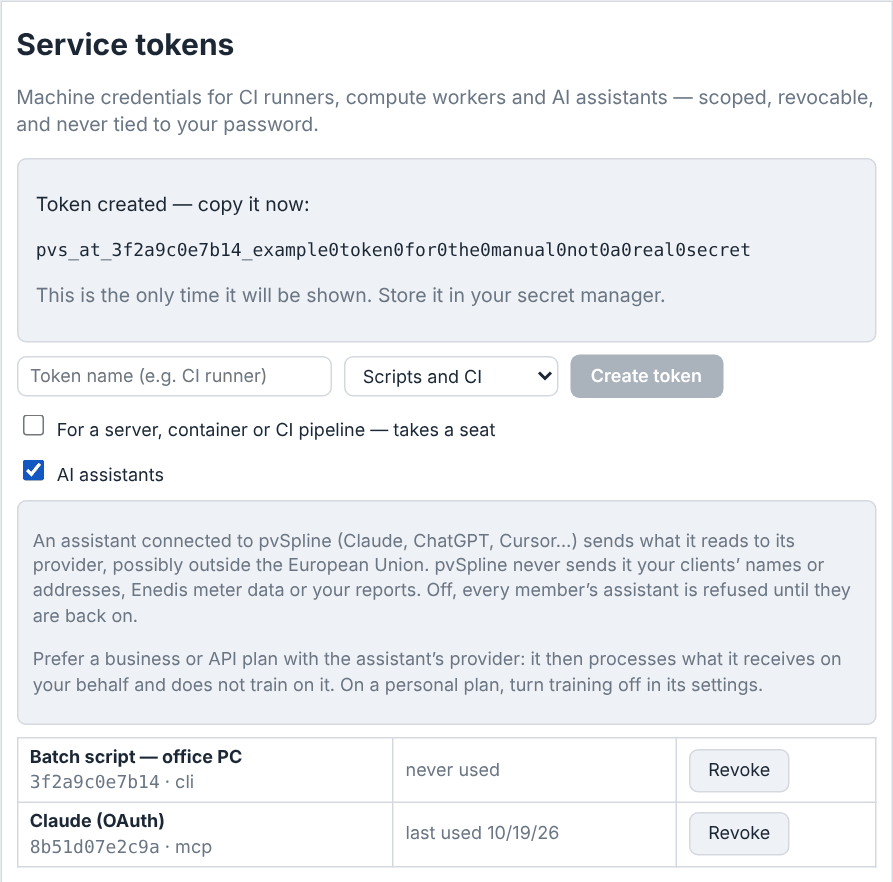
A token looks like pvs_at_… and is presented as Authorization: Bearer <token>. What it can do is deliberately bounded:
It acts as the person who minted it, in their company: it reads the details, input and results of its owner's own runs only, and an endpoint closed to service tokens refuses it with
403SERVICE_TOKEN_FORBIDDEN. For a server, a container or a CI pipeline, mint the token from an account with the User role, not from a Manager account or the company's founding member (Roles, and what a manager can change).It cannot mint another token.
It is not affected by a password change, and a password reset does not kill your CI runner. Its revocation is its own: Revoke, immediate, per token.
Unlike a browser session, it does not have to sign its requests. A logged-in browser session signs every authenticated call with a per-user key; a token-only client has no such key and is not asked for one. That is what makes a token practical from a shell.
A token minted on the Account page does not expire: it lasts until it is revoked, or until its owner's account is deleted.
You may hold up to
25active tokens, counting the connections AI assistants hold.
Submitting a cloud run
Queueing work in the cloud needs an active plan — the free plan or a subscription — that covers cloud simulation; without it the service answers 402 before anything is queued. Every route below hangs off the cloud API's address, https://api.pvspline.fr.
| Cloud job API | Meaning / effect |
|---|---|
| GET /saves | The cloud saves you can open, each with its id — the save_id a run is filed under. |
| POST /simulations | Body {save_id, project, kind?, options?, report_theme?, language?, verification_qr?}. save_id names one of your cloud saves — it is the authorization subject, the quota subject and the link the results view follows. project is the portable project document the worker will actually run. kind is run (the default), optimize or batch; options carries the optimizer knobs or the batch config and is only valid for those two. report_theme and verification_qr shape a run's rendered artifacts and are refused with any other kind. report_theme names a company report theme. language is the locale the job is written in, such as fr, whatever its kind: a run's artifacts — their words, and the figures of the report, its one-line diagram page included, and of the workbook's summary rows; the CRE dossier stays in French — and its notes and warnings, an optimization's candidate names (12.0 kWp, 12.0 kWc in French) and warnings, a batch's warnings. verification_qr: true stamps the verification QR on the cover of report.pdf, attesting the run's consumption and production series (Report verification), and stores the code's payload beside it as report.pdf.qr.bin. Without it the report carries no code; the runs the web app starts always ask for one. Answers 202 with {id, status, kind}. |
| GET /simulations | Your company's jobs, most recent first, capped at 50. Each carries its save_id and save_name, the project's current name — null for a project you cannot open: a colleague's, when you have User rights or use a service token, or one deleted since the run. The list carries no download links; read one job for those. |
| GET /simulations/{id} | One job: status, timestamps, save_name, error_message, engine_version, kind, and what it has counted against the allowance. Once succeeded it also carries a presigned result_url and, per artifact, artifact_urls — names among report.pdf, report.pdf.qr.bin, report.pdf.sig, export.xlsx, dossier.pdf and charts/<token>.png. Artifacts exist for plain runs only, and one that fails to render is simply absent, so follow the names the job lists. The links last an hour; read the job again for fresh ones. A caller with User rights, and every service token, reads its own jobs only: a colleague's answers 404. |
| GET /simulations/{id}/input-url | A presigned URL for the exact project document this job ran. 404 INPUT_EXPIRED once it has aged out of its 30-day retention — re-queue the run to re-stage it. |
| DELETE /simulations/{id} | Cancel a queued run (204). It then reads failed, with the message cancelled by user, and costs nothing. Once a worker has claimed it, 409 — a started run cannot be interrupted. |
Downloads are bare fetches of the presigned URLs: no authorization header, because the signature is the authorization.
For a batch job, options is required: the envelope {config, options?}, where config says what to run and options how. config sets exactly one of scenarios, parts and axes, plus an optional nameTemplate, and expands to at most 1000 scenarios.
| Batch envelope | Meaning / effect |
|---|---|
| config.scenarios | Explicit rows, one scenario each, every key optional: name, overrides, panel, inverter, inverterCount, battery and policy. overrides maps an engine column name — the heading of a parameter column on the Batch view's scenario board, such as battery_capacity — to the scenario's value; an empty value keeps the project's own. panel, inverter and battery swap in a part by its fingerprint, and inverterCount, 1–10000, goes with inverter and sets how many units of it the row runs. policy accepts only offline: a cloud batch works from the series the project embeds. A row with no name is called Scenario N. |
| config.parts | A component shoot-out, one scenario per entry: {category, fingerprint, name?}, category being module, inverter or battery and name the scenario's name. |
| config.axes | A sweep or, with several axes, every combination of their values: each axis is {label, values}, {label, from, to, step} or {label, from, to, count}, label being an engine column name. |
| config.nameTemplate | The scenario-name template of the Name: field on the Batch view's Sweep and Matrix pages, with the same placeholders (Batch Simulation & Scenario Sweeps). |
| options | The run settings, each optional. objective picks the winner: van, the default, by NPV, or tri by equity IRR. onFetchError is fallback (the default), abort or skip, and keepPolygonCoordinates a boolean, as On fetch failure and Keep polygon coordinates set them in the Batch view. artifacts cannot ask for per-scenario exports: a cloud batch delivers its comparison table only. |
The service checks the envelope before it queues anything, and answers 400 BATCH_OPTIONS_INVALID, its message naming the problem, to an unknown key in the envelope, a row, an axis or the run settings; to two of scenarios, parts and axes at once; to a malformed or out-of-range value; and to more than 1000 scenarios. A problem only the engine can see — a column name it does not know or cannot sweep, a row name holding a slash or a backslash — is caught later: the job is queued, then fails with the reason in its error_message.
A batch job's result_url is its comparison table, {columns, rows, stringPlans?, winnerIndex?, winnerBy?, warnings?}: one row per scenario under the column tokens name, design, status, payback, npv, npv_eur, lcoe_eur_per_kwh, performance_ratio, yield_kwh_per_kwp, production_kwh, near_shading_loss_kwh, near_shading_loss_pct, irr_pct, dscr_min and llcr. payback and npv are display labels and npv_eur is the number; irr_pct (the equity IRR), dscr_min and llcr are null where the scenario has no such figure — no IRR, no loan. A row's figures mean something only when its status is succeeded: a failed row carries 0 in every column from npv_eur to near_shading_loss_pct, empty payback and npv labels, and null in irr_pct, dscr_min and llcr. winnerBy says which metric picked winnerIndex, npv or irr; stringPlans, parallel to rows, holds the string layout each resized or re-parted row was scored on.
A row that swaps in a part — its panel, inverter or battery — runs only when the project embeds that part in its panelLibrary, inverterLibrary or batteryLibrary, or when the part is one of the components shipped with the application. Any other such row comes back failed, and warnings names the scenario and the part. The Batch view embeds your company's own parts before it submits; a script has to embed them itself.
Watch out
The project travels separately from the save it is filed under, so the two can disagree. The service compares them and answers 409 PROJECT_SAVE_MISMATCH rather than silently filing a run — and its quota — under an unrelated save. Send confirm_mismatch: true only when the divergence is deliberate. Other refusals worth handling: 422 PROJECT_NOT_PORTABLE (you sent a flat save row, not a project file), 413 PROJECT_TOO_LARGE, 404 THEME_NOT_FOUND (an unknown report_theme), 400 REPORT_THEME_INVALID or VERIFICATION_QR_INVALID (a malformed value, or one sent with a kind other than run), LANGUAGE_INVALID (a malformed locale code), 402 (no active entitlement), 429 (monthly quota exceeded, with the numbers) and 429 API_ALLOWANCE_EXCEEDED (the token owner's monthly cloud API allowance is spent). A 503 that carries a Retry-After header means the service is briefly unavailable: wait that long and retry.
Through an AI assistant
pvSpline's cloud API also speaks the Model Context Protocol (MCP), the open standard AI assistants use to call tools. Connected to your account, an assistant such as Claude Code, Cursor or VS Code works on your projects at your request: it creates a project from an address or coordinates and its arrays, runs it on the cloud engine and explains the results, with links to open the project, its results and its PDF report in the web app.
AI Assistants is the whole guide: what you need, the entry to add for each client, every tool the assistant can call, and what its runs and requests count against.
Authentication and accounts — signing in, sessions, plans and what an entitlement covers — belong to Your Account, Team & Cloud Runs.